001skills.
dbtour
SQL Server · Azure SQL · SQLite · MCP · MIT
dbtour shows you what is inside a database: every table, what it holds, how big it is and how it connects. You browse it as a page, keep it as docs in your repository, and hand it to your AI assistant. It documents a database from its structure, never its data; rows are read only when you run a query, through a login that can only read.
Your database, documented where you work. To document it, dbtour reads the catalogue, never the rows, and writes one model into your repository: a page people search, follow and query, Markdown GitHub shows, and the same tour for your coding agent.
Try it
nothing to installNot a picture: this is the one HTML file dbtour render writes, here for three databases on one page. Shop is made up and on SQL Server; Chinook and Northwind are two well-known samples, read as SQLite files. Choose one, switch to another from the rail, search across all three, open a table, follow a relation, open the map, write a query in each one's own SQL. It holds the structure and no rows, so a query is written here and run on your own machine.
Open the example on its own pagedbtour 0.11.2 · examples/several
The family
one model, six ways to use it- A
The app
The page: set a database up, search the catalogue, read an entry, open the map, write and run read-only SQL. On your machine through dbtour serve, or one HTML file you deploy.
dbtour serve - B
The CLI
init, extract, render, sql, serve, mcp: the model and its Markdown kept in your repository and checked in CI.
npm i -D dbtour - C
The skill
Teaches an agent when to reach for dbtour, and to write SQL only from the names the model has.
npx skills add victorsaly/dbtour -g - D
The MCP server
The model a piece at a time for any MCP client: an overview, a search, one table, the joins between two.
claude mcp add dbtour -- npx dbtour mcp - E
The Claude Code plugin
The skill and the MCP server in one install.
/plugin marketplace add victorsaly/dbtour /plugin install dbtour@dbtour - F
The packages
A source per database (SQL Server, SQLite), the page and the keychain, so you install only what you use.
dbtour-source-mssql · dbtour-source-sqlite · dbtour-addon-explorer · dbtour-keychain
In and out
what dbtour printed; … marks a cutThe app
Innpx -y -p dbtour … dbtour serve
OutServing the setup at http://127.0.0.1:4321 Nothing is set up yet: the page at http://127.0.0.1:4321/ walks you through it. Ctrl+C to stop.
The browser opens on the setup; five steps later, on the catalogue.
The CLI
Incd examples/shop npx dbtour render
OutWrote 8 files to docs. # docs/tables/dbo.Orders.md # dbo.Orders One row per checkout. The lines are in dbo.OrderLines. About 312,904 rows · 29 MB of data · 9.3 MB of indexes, as the database counted them on 2026-11-01. … | CustomerId | int | no | | FK → [dbo.Customers](dbo.Customers.md).Id | | | Status | tinyint | no | `((0))` | | 0 draft, 1 paid, 2 shipped, 9 cancelled | …
One Markdown page per table, with its diagram, and index.html.
The skill
InThis project has dbtour set up and its MCP server is connected. Write me a SQL Server query for each customer's total of paid orders this year, largest first. Don't run anything: tell me how you'll find the tables and columns, then the query.
OutI'm not going to fill the query in with likely-sounding names like dbo.Orders or Total. A guessed name can look right and still sum the wrong column. […] 1. overview: lists the databases and their tables, largest first. […] 2. search for order, customer, paid / payment / status, and total / amount. […] 3. table on each table I'll use […] If nothing says, I'll ask you rather than guess. 4. path between orders and customers if they aren't directly related, to get the JOIN. […]
An agent's reply with the skill, from dbtour's evals (sql-reads-first), graded “reads the tables first”: pass.
The MCP server
In{"name": "path", "arguments": {"from": "dbo.OrderLines", "to": "dbo.Customers"}}Outdbo.OrderLines to dbo.Customers: 2 joins. FROM [dbo].[OrderLines] JOIN [dbo].[Orders] ON [dbo].[Orders].[Id] = [dbo].[OrderLines].[OrderId] JOIN [dbo].[Customers] ON [dbo].[Customers].[Id] = [dbo].[Orders].[CustomerId] Each JOIN follows a relation as the docs record it; read the tables to choose the columns and whether a LEFT JOIN suits.
Also overview, search and table; query when a source has a reader.
The Claude Code plugin
In/plugin marketplace add victorsaly/dbtour /plugin install dbtour@dbtour then its search tool: {"name": "search", "arguments": {"query": "customer email"}}Out- column dbo.Customers.Email: Login address.
The skill and the MCP server, installed together.
The packages
In# dbtour.yaml sources: - type: sqlite name: Notes file: notes.db reader: read-only npx dbtour extract npx dbtour sql "SELECT a.name, COUNT(*) AS notes FROM notes n JOIN authors a ON a.id = n.author_id GROUP BY a.name" npx dbtour sql "DELETE FROM notes"OutNotes: 2 tables, 1 relations Wrote docs/schema.json. Run dbtour render to write the docs. | name | notes | |---|---| | Ada | 2 | | Lin | 1 | 2 rows. The query starts with DELETE: dbtour runs only a SELECT, or a WITH followed by a SELECT.
dbtour-source-sqlite: a file, opened read-only, nothing else to install. The refused query exits 1.
Start in one line
npx -y -p dbtour -p dbtour-source-mssql -p dbtour-source-sqlite -p dbtour-addon-explorer -p dbtour-keychain dbtour serveYour browser opens on the setup. Run the same line again to come back, or to add another database.
The tour
every area, against a real SQL ServerA minute and a half, narrated and captioned: from one command to a documented SQL Server database, then the same tour for an AI agent. The database is a demo with made-up rows.
Areas
8 of them- 01
Setup
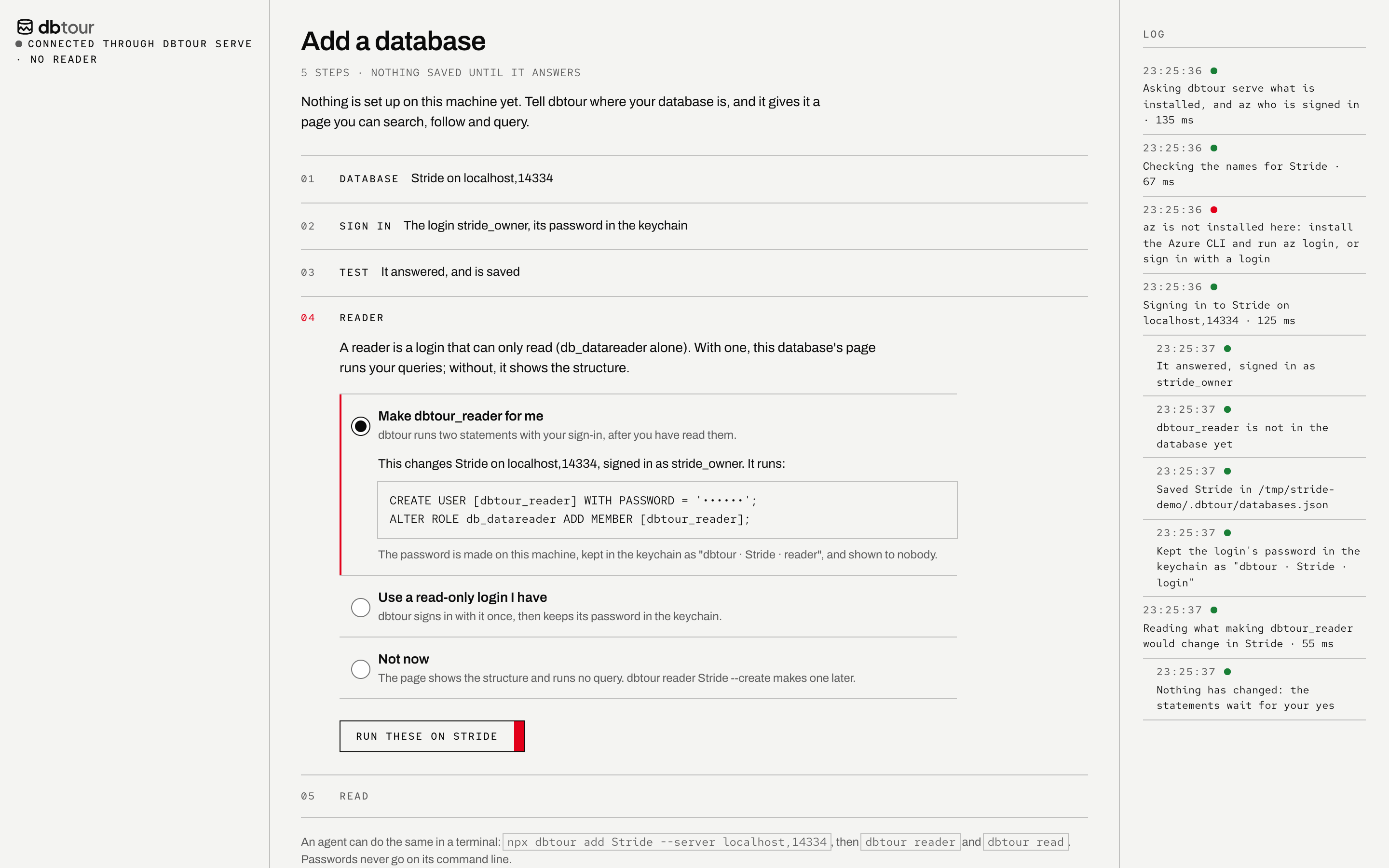
One line opens a page that sets your database up in five steps: where it is, how dbtour signs in (Entra through az, or a login whose password goes to the system keychain), a test, a read-only login, the read. Nothing is saved until it answers, and nothing in the database changes until you have read the two statements.
- 02
Catalogue
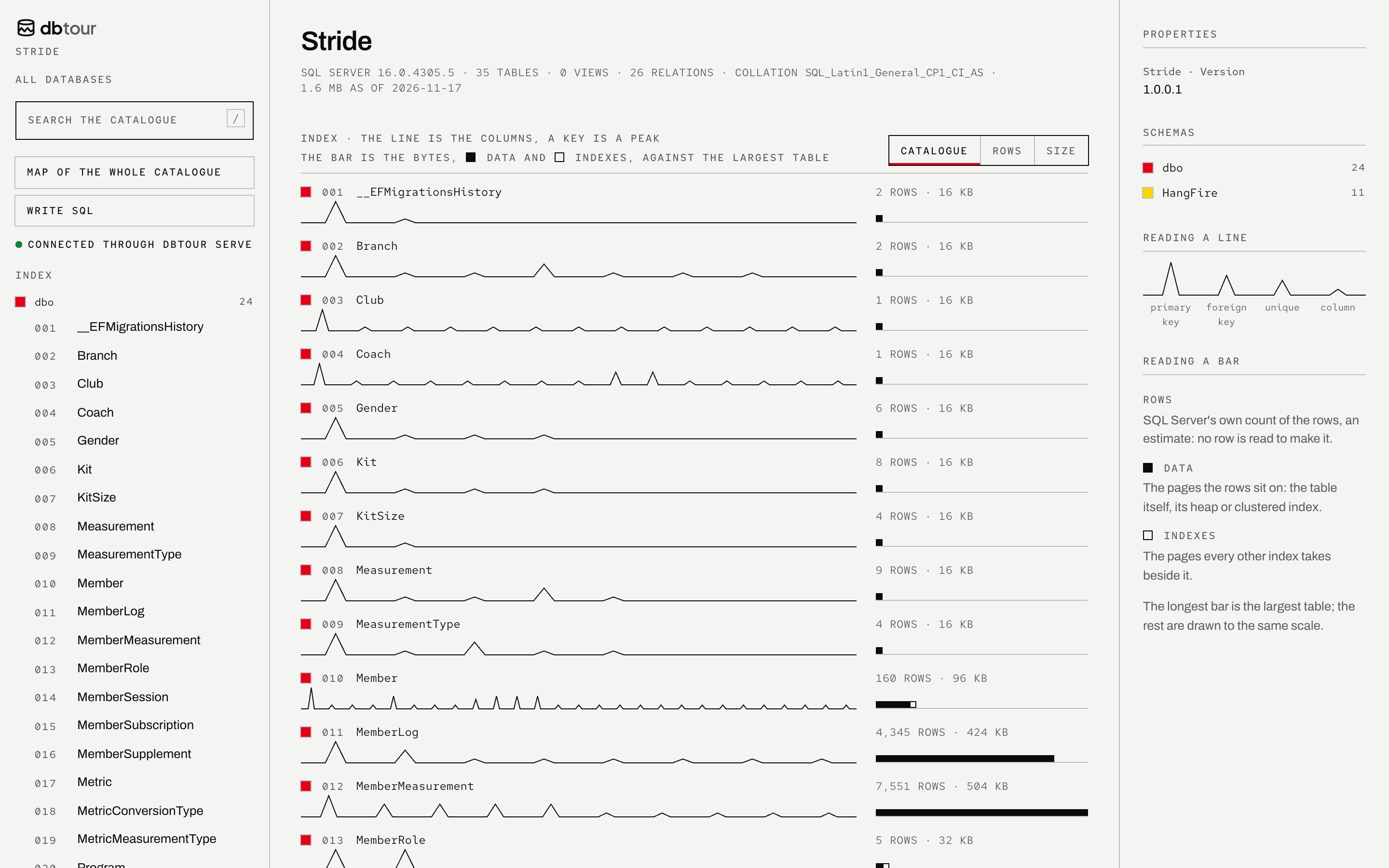
Every table on one page, numbered, by schema, each drawn as a line with a peak per key and a bar of its size, read from the catalogue and never from a row.
- 03
Entry
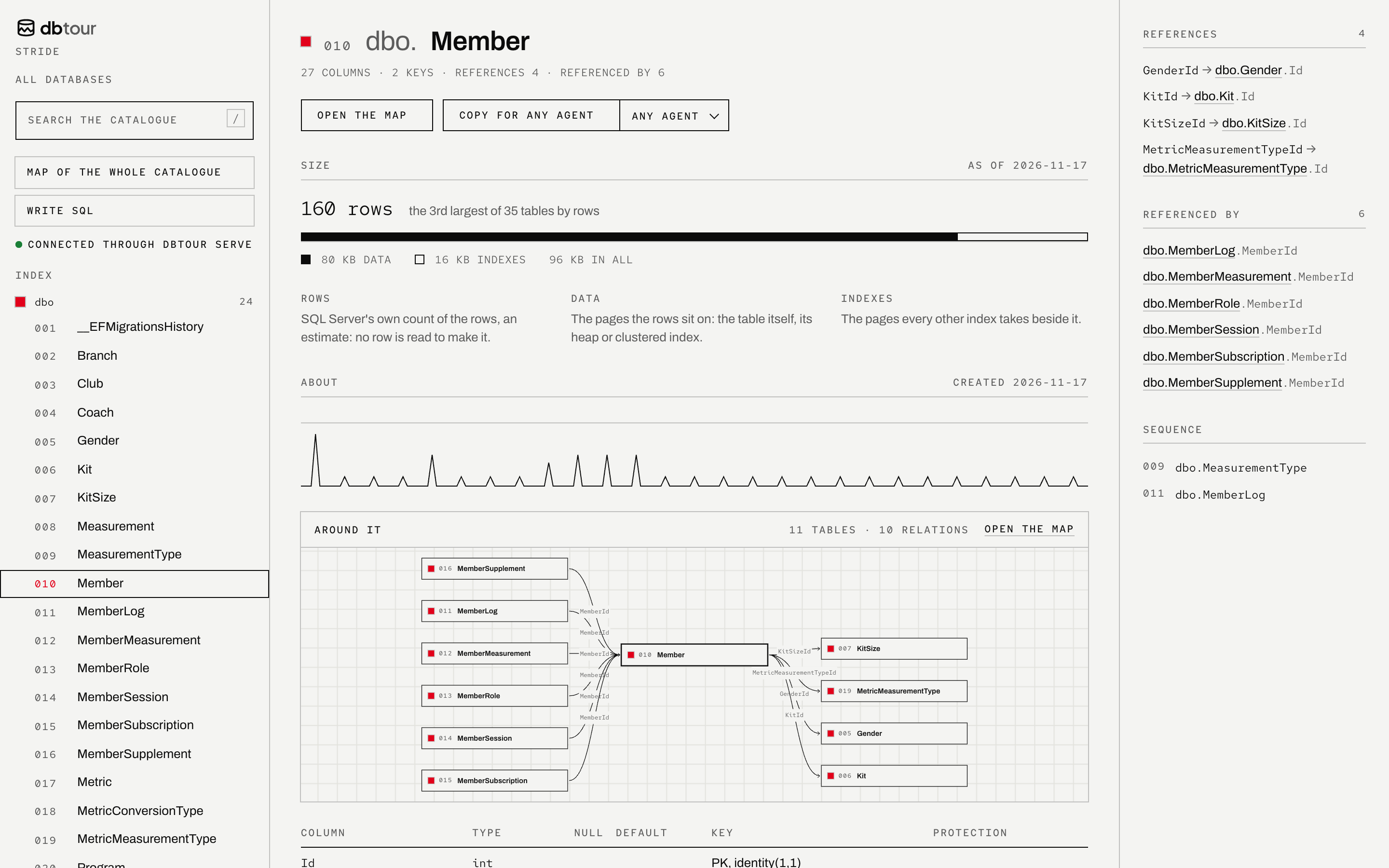
A table gets an entry: how many rows and how big, where it ranks, what it references and what references it, and a map of its neighbourhood.
- 04
Protection
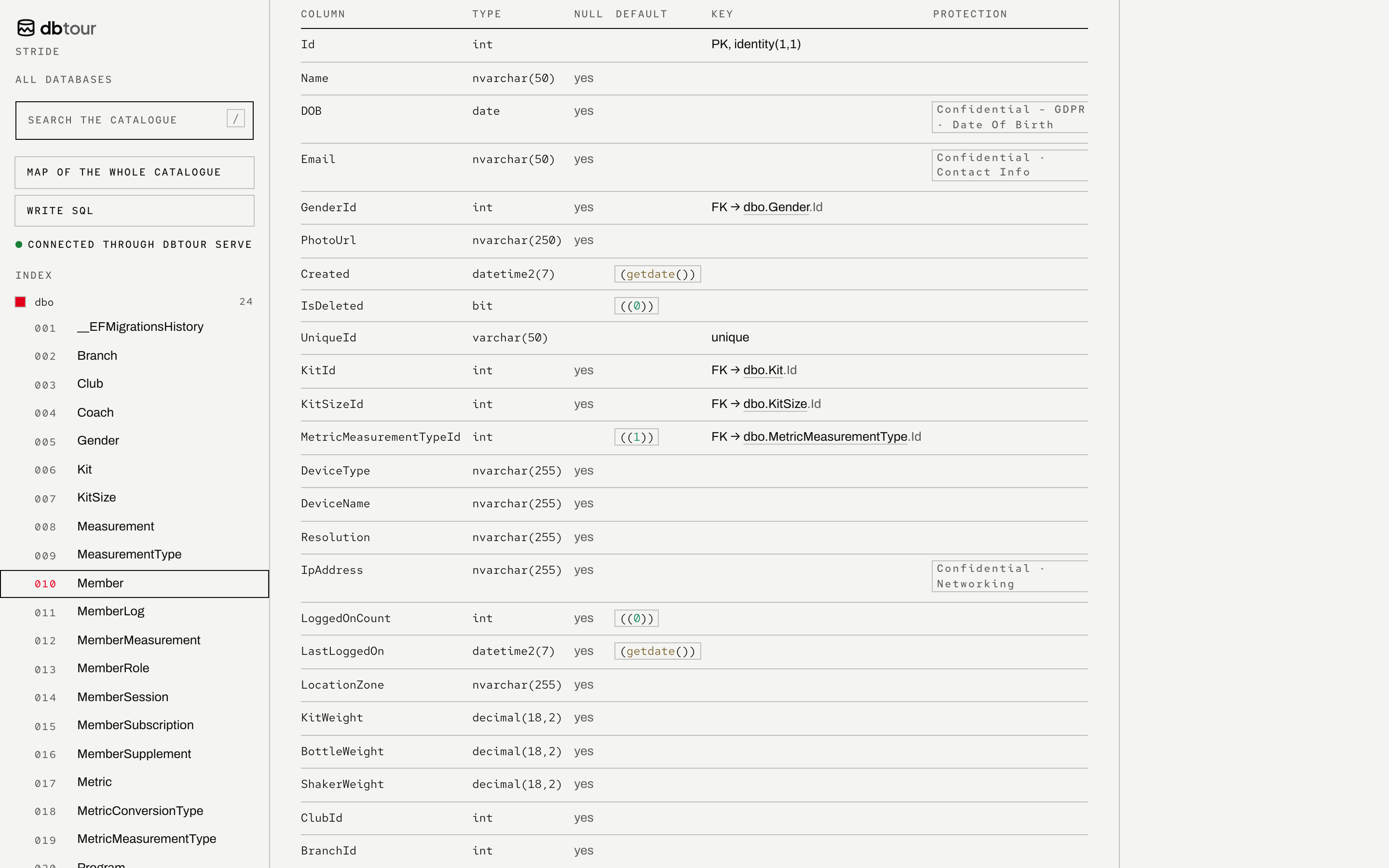
Columns with their types, keys and defaults, and whatever someone protected: sensitivity labels, masking and Always Encrypted, marked where you read the column.
- 05
Map
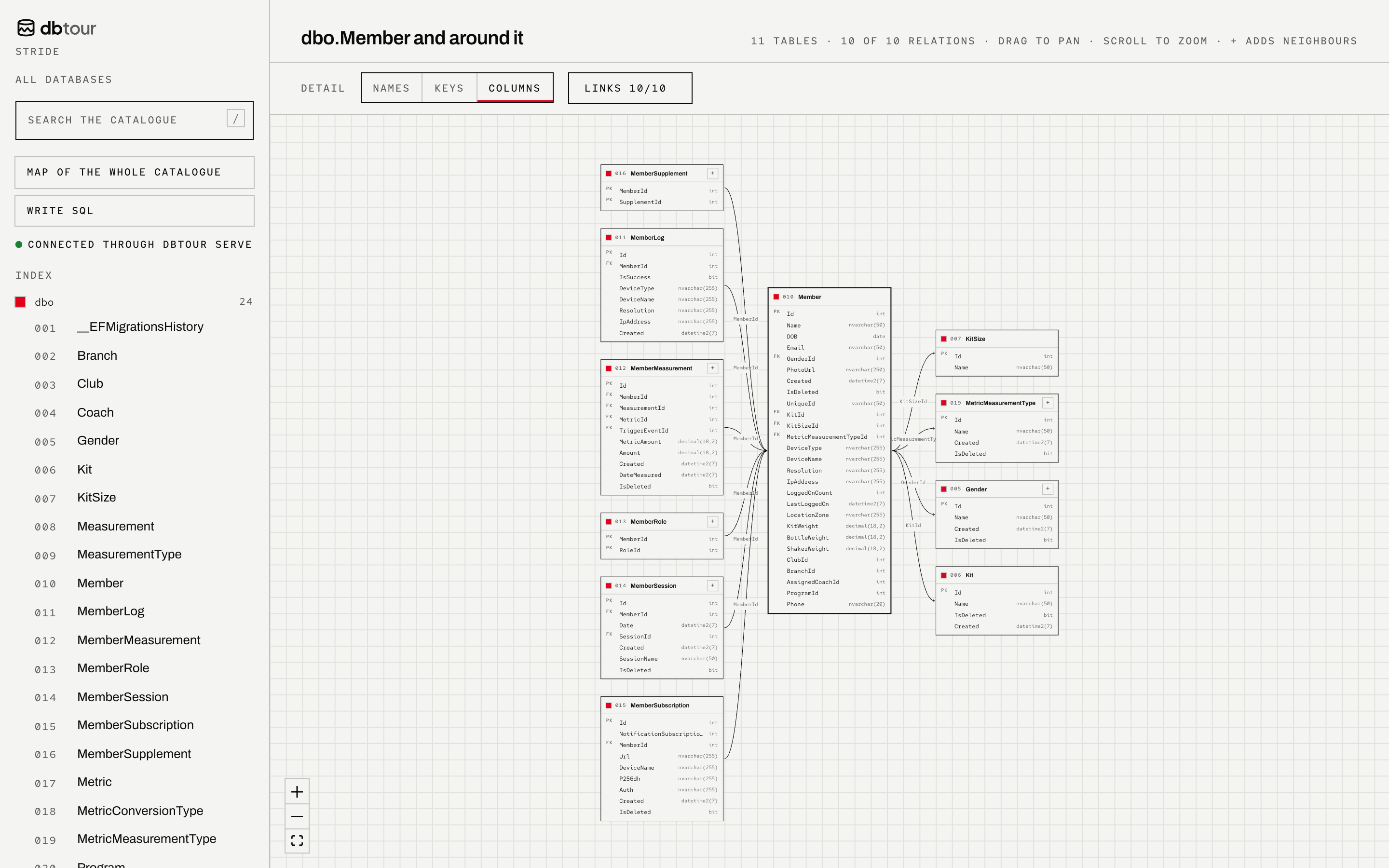
Open the map to draw a table and its neighbours large, by names, keys or every column; add neighbours one at a time, never the whole schema at once.
- 06
Query
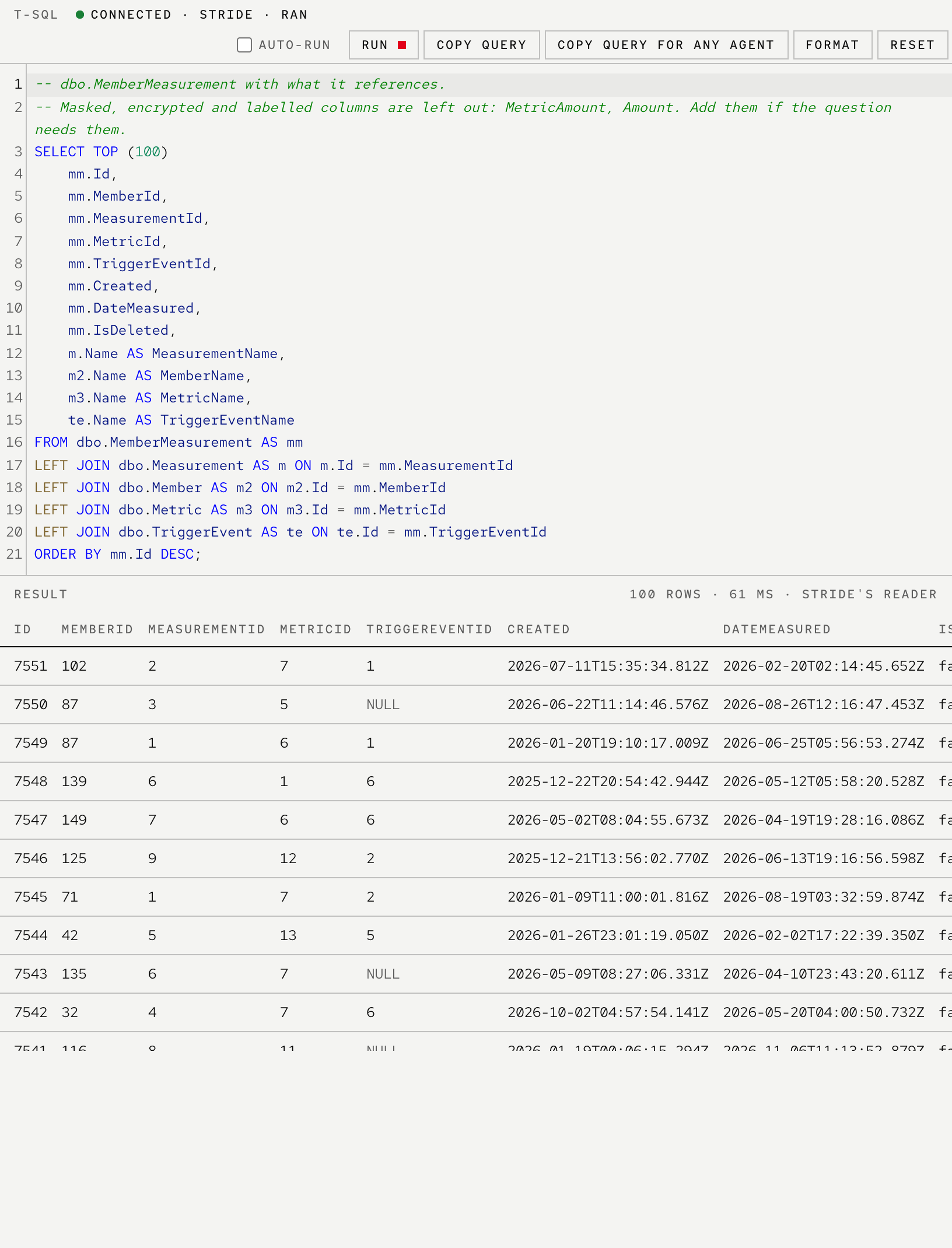
Each entry starts a query from its table and what it references, leaving the protected columns out and saying so. Served by dbtour serve, it runs through the read-only login: checked, rolled back, at most 100 rows.
- 07
Write SQL
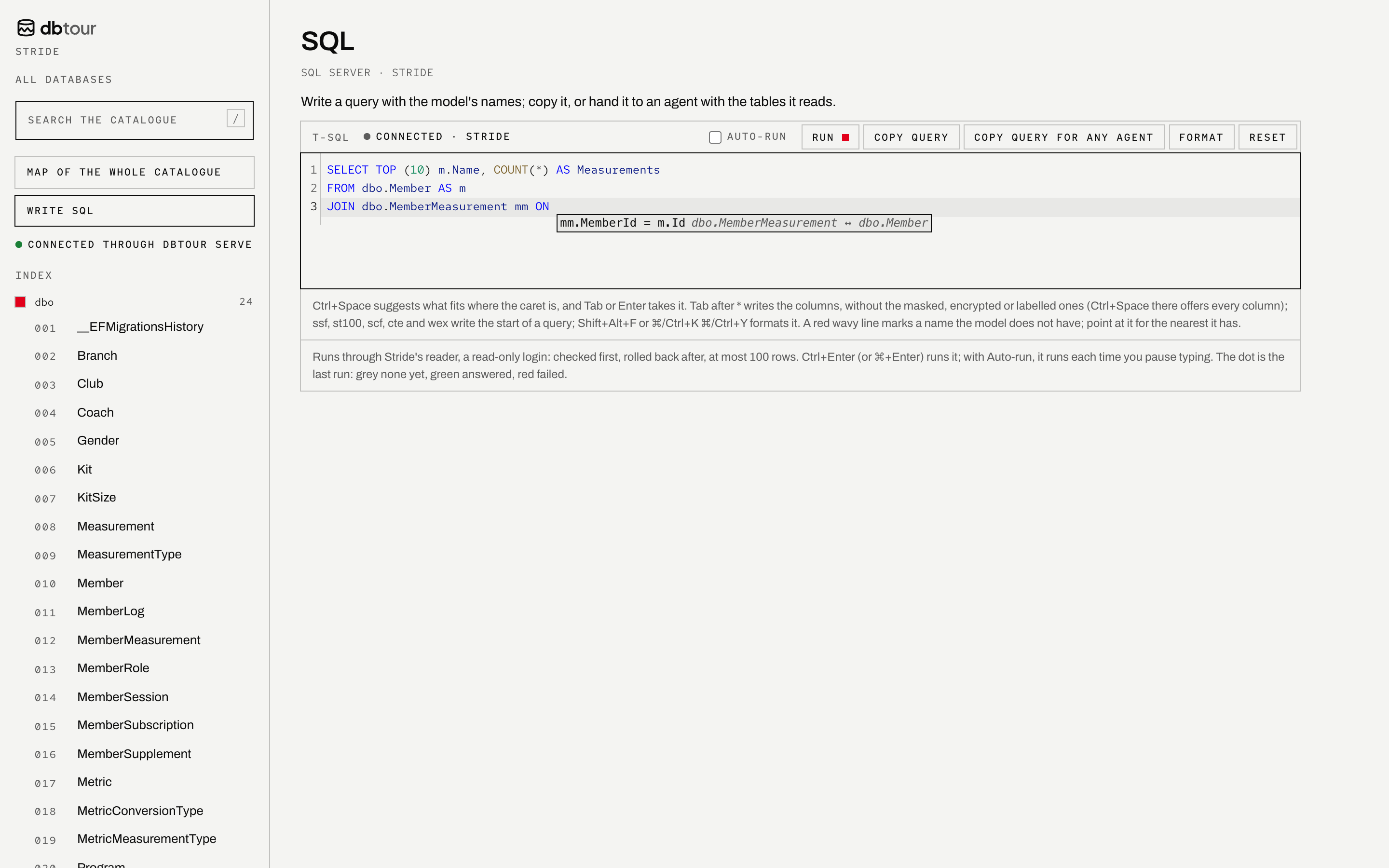
An editor that knows the model: it completes tables and columns, offers the join a relation records as soon as you type ON, marks a name the model does not have, and hands the query to an agent with the tables it reads.
- 08
Your agent
dbtour mcphands the same model to Claude Code or any MCP client, a piece at a time: an overview, a search, one table, the joins between two. The dbtour skill tells the agent when to use it and to write SQL only with the names the model has. With a reader, it can run a read-only query to check what it wrote.npx skills add victorsaly/dbtour -gclaude mcp add dbtour -- npx dbtour mcp
In a project
kept in git, checked in CInpm install --save-dev dbtour dbtour-source-mssql dbtour-addon-explorer
npx dbtour init # dbtour.yaml: the connection string stays in an environment variable
export DBTOUR_MSSQL='Server=…;Database=…;User Id=…;Password=…' # in your shell, never in a file
npx dbtour extract # docs/dbtour/schema.json
npx dbtour render # Markdown with Mermaid diagrams, one page per table, and index.htmlNotes in dbtour.notes.yaml add descriptions and relations the database cannot keep, without altering it. The full guide is in the README; the packages are on npm.
Common questions
if you are new to itWhat does dbtour do, in one line?
It shows you what is inside a database: every table, what it holds, how big it is and how it connects. You browse it as a page, keep it as docs in your repository, and hand it to your AI assistant.
Does it read my data?
No. To document a database it reads only its structure: tables, columns, keys and the sizes the database already counts. Rows are read only when you run a query yourself, through a read-only login, at most 100 rows, always rolled back, and never written into the docs.
Will it change my database?
No. The one exception is the read-only login it can make for queries, and only after it shows you the two statements and you press the button. You can skip it.
Which databases does it work with?
SQL Server, Azure SQL and SQLite today. PostgreSQL is next and MySQL is planned.
Where do my passwords go?
Into your system’s keychain (macOS Keychain, Windows Credential Manager, the Secret Service on Linux). In a project, the connection string stays in an environment variable that dbtour.yaml names; it is never written to a file.
Does my database’s structure go to an AI?
Only if you use an agent. The page and the docs stay on your machine or wherever you put them. What the MCP server answers your agent goes to the model provider that agent uses, so a schema that must not leave your network needs a model that stays inside it.
What do I need to run it?
Node.js 22.18 or newer. The one line at the top downloads the rest; nothing is installed for good until you choose to.
Can my team use it?
Yes: the page is one HTML file and the docs are Markdown, so they live in your repository and can be deployed to any static host behind your own sign-in. A deploy workflow for CI is on the roadmap.
Which AI agents does it work with?
Claude Code, Codex, Cursor and any client that speaks MCP. The skill teaches the agent to look tables up before it writes SQL.
What does it cost?
Nothing. It is open source under the MIT licence.
Roadmap
the plan has the detail- Released
- SQL Server and Azure SQL
- SQLite
- The page: search, entries, the map, SQL
- The MCP server, the skill and the Claude Code plugin
- Setup on the page, passwords in the keychain
- Next
- PostgreSQL
- Planned
- MySQL, and schemas from tbls or pasted in
- OpenAPI: which endpoint reads which table
- A deploy workflow and dbtour check for CI
- Index and table usage on each entry
- Descriptions an agent suggests, kept for your review
- Lookup values you choose to keep, beside their codes
Filmed on Stride: the structure and sizes of a real app's database, with every table and column that could identify it renamed and every row made up, on SQL Server 2022 on this machine. Every frame and still is dbtour itself, version 0.11; the agent's answer in the films is what dbtour mcp returned. Voice and music by ElevenLabs.